AI Image Apps: Explained
Introduction
This guide covers ai image apps explained in detail. Understanding ai image apps explained helps readers make better, more informed decisions.
AI image apps have moved from niche experimentation to mainstream creativity tools, reshaping how we capture, edit, and generate visual content on our phones. By embedding generative models, computer vision, and real‑time filters, these apps let users transform ordinary photos into polished portraits, surreal artwork, or professional‑grade graphics with a single tap. The surge in mobile GPU power and cloud APIs has lowered entry barriers, enabling developers to integrate sophisticated AI into lightweight apps that run locally
or offload heavy processing to the cloud. For photographers, designers, and casual users alike, AI image apps offer a new workflow that blends automation with artistic control, saving time while expanding creative possibilities. This guide unpacks the core technologies, popular tools, and practical use cases that define today’s AI image app landscape, helping you decide which solutions fit your needs and how to leverage them effectively. Understanding ai image apps explained helps readers make better, more informed decisions.
How AI Image Apps Work — ai image apps explained
At their heart, AI image apps rely on two main AI families: generative models and computer‑vision inference. Generative models, such as diffusion networks and transformer‑based image generators, learn from millions of images to produce new visuals that mimic styles, textures, or subjects. Computer‑vision models, including convolutional neural networks and vision transformers, analyze existing photos to detect faces, objects, or scenes, enabling tasks like background removal, style transfer, or super‑resolution. Many apps combine both: a user uploads a photo, the vision model identifies a subject, and a generative model re‑renders it in a different style or fills in missing details. Understanding ai image apps explained helps readers make better, more informed decisions.
Key Features of Modern AI Image Apps
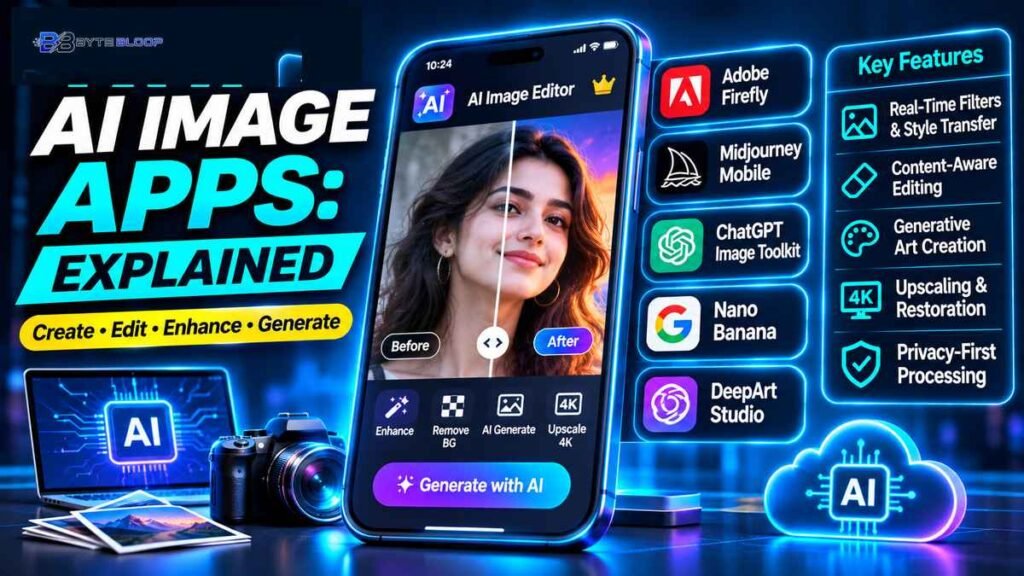
Real‑time Filters and Style Transfer – Apps apply neural style transfer on the fly, letting users preview a Monet‑like effect before saving. Content‑Aware Editing – Object‑specific adjustments, such as removing a watermark or enhancing a single face, are powered by segmentation models. Generative Art Creation – Text prompts or sketch inputs generate full‑scale images, often with controllable parameters like color palette or composition. Upscaling and Restoration – Super‑resolution models upscale low‑resolution images to 4K while preserving texture fidelity. Privacy‑First Processing – Edge computing options keep user data on device, reducing latency and compliance concerns. Understanding ai image apps explained helps readers make better, more informed decisions.
Popular AI Image Apps in 2026
1. Adobe Firefly Mobile – Integrated with Creative Cloud, Firefly offers generative overlays, background removal, and style transfer, all within a familiar Adobe workflow. Pros: Seamless cloud sync, professional presets. Cons: Requires subscription. 2. Midjourney Mobile Companion – A lightweight client for the Midjourney Discord bot, enabling prompt‑based image generation on the go. Pros: Artistic depth, community sharing. Cons: Limited offline use. 3. ChatGPT Image Toolkit – Leveraging OpenAI’s image API, this app lets users describe scenes and receive high‑resolution renders. Pros: Natural language interface. Cons: API cost per image. 4. Nano Banana – A Google‑powered app that excels at quick edits and AI‑driven photo enhancement, optimized for Android devices. Pros: Free, fast. Cons: Fewer creative controls. 5. DeepArt Studio – Focused on style transfer, it offers a library of classic and contemporary art styles for instant application. Understanding ai image apps explained helps readers make better, more informed decisions.
Use Cases That Drive Adoption
Social Media Content Creation – Influencers use AI filters to produce eye‑catching thumbnails and story visuals without hiring a designer. Marketing and E‑commerce – Brands generate product mockups and lifestyle images quickly, reducing production costs. Personal Photography – Hobbyists edit vacation photos with AI‑powered enhancements, such as HDR merging and background swaps. Accessibility – Vision‑impaired users receive descriptive captions or enhanced contrast through AI vision models. Understanding ai image apps explained helps readers make better, more informed decisions.
Developing Your Own AI Image App
Building a competitive AI image app requires a clear strategy: choose the right model (e.g., Stable Diffusion for generation, U‑Net for segmentation), decide on local vs. cloud inference, and optimize for battery life. According to the 2026 AI in Mobile App Development guide, developers should adopt modular architectures, allowing them to swap models as new research emerges. Open‑source frameworks like TensorFlow Lite and ONNX Runtime enable on‑device inference, while cloud APIs from OpenAI, Google, and Microsoft offer scalable compute for heavy workloads. Cost analysis is critical; a balanced approach often uses local pre‑processing and cloud‑based heavy lifting to keep user experience snappy while controlling API usage fees. Understanding ai image apps explained helps readers make better, more informed decisions.
Challenges and Future Trends
Privacy concerns remain a top hurdle; users want assurance that their photos are not stored on third‑party servers. Edge AI is advancing, with newer chips offering 10× faster inference, which will push more features offline. Additionally, multimodal AI—combining text, audio, and image—will enable richer interactions, such as generating an image from a spoken description or editing a photo based on a voice command. The next wave of AI image apps will likely blend these capabilities, offering seamless, privacy‑preserving creative workflows. Understanding ai image apps explained helps readers make better, more informed decisions.
Key Takeaways
- AI image apps blend generative models and computer‑vision for real‑time editing and creation.
- Popular tools include Adobe Firefly, Midjourney Mobile, and ChatGPT Image Toolkit, each with distinct strengths.
- Key use cases span social media, marketing, personal photography, and accessibility services.
- Developers should balance on‑device inference with cloud APIs to manage cost and performance.
- Future trends point to edge AI, multimodal interaction, and stronger privacy controls.
Frequently Asked Questions
What is an AI image app?
An AI image app is a mobile application that uses artificial intelligence models—such as generative networks or computer‑vision algorithms—to edit, enhance, or create visual content directly on a smartphone or tablet. Understanding ai image apps explained helps readers make better, more informed decisions.
What are the key features of AI image apps?
Key features include real‑time filters, content‑aware editing, generative art creation from text prompts, upscaling and restoration, and privacy‑first on‑device processing.
What are the best use cases for AI image apps?
They excel in social media content creation, marketing asset generation, personal photography enhancement, and accessibility tools that provide descriptive captions or contrast adjustments.
What are the pros and cons of using AI image apps?
Pros: rapid creative workflows, cost savings, and advanced editing capabilities. Cons: potential privacy concerns, reliance on cloud APIs for heavy models, and occasional inconsistencies in generated results.
Conclusion
Based on the available information and industry analysis, AI image apps are reshaping mobile creativity by combining generative models with computer‑vision inference to deliver real‑time editing, artistic generation, and content‑aware enhancement. As edge AI advances and privacy standards tighten, these tools will become even more accessible, empowering users—from casual photographers to professional designers—to produce high‑quality visuals without the need for expensive software or hardware.
Related Reading
- Top 10 AI Photo Editing Apps for 2026
Related Articles