TVs: Explained
Introduction
Televisions have moved far beyond the bulky cathode‑ray tubes of the past. Today’s models are thin, smart, and packed with technology that can rival a computer in terms of connectivity and performance. The term TVs explained encompasses everything from display tech like OLED and Mini‑LED to the software ecosystems that turn a screen into a media hub. Whether you’re a casual movie watcher or a home‑theatre enthusiast, understanding the core differences between 4K, 8K, HDR, and the various backlight technologies is essential for making an informed purchase. In addition, the rise of voice assistants, screen mirroring, and app ecosystems means that a TV is now a central node in a smart home network. This guide breaks down the key concepts, highlights the latest trends for 2026, and offers practical advice on choosing the right model for your space. Understanding tvs explained helps readers make better, more informed decisions.
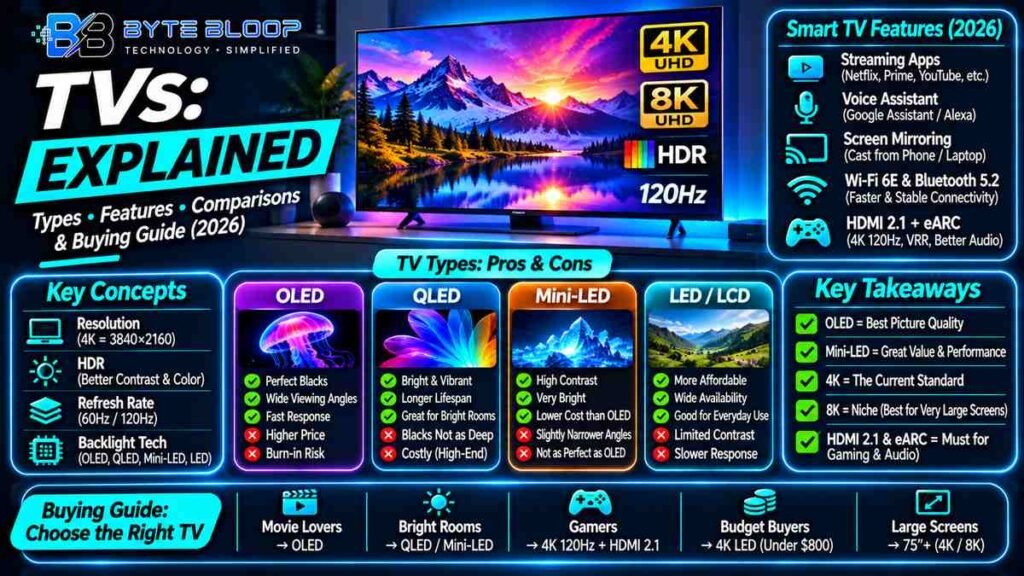
First, let’s demystify the most common terms you’ll encounter. 4K UHD refers to a resolution of 3840×2160 pixels, offering four times the detail of 1080p. HDR (High Dynamic Range) expands contrast and color gamut, making bright highlights pop while preserving deep blacks. Backlight types—LCD, OLED, QLED, Mini‑LED, and RGB LED—dictate how light is delivered to the screen, affecting contrast, color accuracy, and power consumption. Finally, the smart layer, powered by operating systems like Android TV or proprietary platforms, unlocks streaming, gaming, and voice control. With this foundation, you can read the specs sheet with confidence and match features to your viewing habits. Understanding tvs explained helps readers make better, more informed decisions.
Display Technologies: OLED vs. QLED vs. Mini‑LED — tvs explained
OLED panels use organic molecules that emit light when electrified, eliminating the need for a backlight. This results in perfect blacks, wide viewing angles, and fast response times, making OLED ideal for cinematic experiences. However, OLEDs can be pricier and may suffer from burn‑in over extended static use. QLED, Samsung’s branded quantum‑dot LED, layers a quantum‑dot film over an LED backlight to boost color saturation and brightness. QLEDs excel in bright rooms and offer longer lifespans, but their blacks are not as deep as OLED’s. Mini‑LED is a hybrid that shrinks the LED backlight into thousands of tiny LEDs, enabling precise local dimming and high peak brightness while keeping costs lower than OLED. For 2026, Mini‑LED is increasingly popular for mid‑range models that still deliver near‑premium contrast. Understanding tvs explained helps readers make better, more informed decisions.
Resolution and Refresh Rates
4K has become the baseline for mainstream TVs, but 8K is gaining traction for ultra‑large screens. While 8K provides four times the pixel count of 4K, the practical benefit is limited unless you sit very close or own a screen larger than 75 inches. Refresh rates—measured in hertz (Hz)—determine how many times the image updates per second. A 120 Hz panel smooths fast action, which is essential for sports and gaming. Many 4K TVs now come standard with 120 Hz, but the real advantage depends on the content’s native frame rate. For casual viewing, 60 Hz is sufficient; for esports or high‑speed sports, 120 Hz is preferable. Understanding tvs explained helps readers make better, more informed decisions.
Smart TV Ecosystems
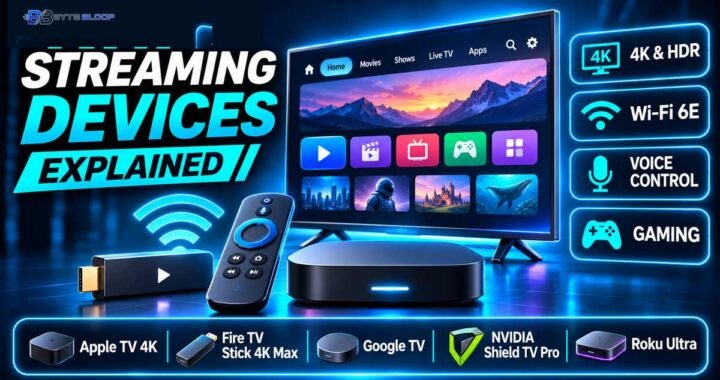
Smart TVs have evolved into full‑blown media hubs. In 2026, the top features include seamless streaming of popular apps, effortless screen mirroring, and integrated voice assistants. Android TV, Roku TV, and proprietary Samsung and LG platforms each offer a curated app ecosystem, but Android TV tends to have the widest app selection. Voice control via built‑in assistants like Google Assistant or Amazon Alexa allows hands‑free navigation and home‑automation integration. Many manufacturers now include HDMI‑CEC and Wi‑Fi 6E for faster, more reliable connectivity, making it easier to link gaming consoles, soundbars, and streaming sticks. Understanding tvs explained helps readers make better, more informed decisions.
Connectivity and Ports
Modern TVs typically feature at least two HDMI 2.1 ports, which support 4K at 120 Hz, variable refresh rate (VRR), and eARC for high‑fidelity audio. An additional HDMI 2.0 port is common for older devices. USB ports—often one USB‑A and one USB‑C—enable media playback and firmware updates. For home‑theatre setups, a dedicated optical audio output or an HDMI eARC port is essential for connecting soundbars or AV receivers. Wi‑Fi 6E and Bluetooth 5.2 are becoming standard, ensuring smooth streaming and peripheral pairing. Understanding tvs explained helps readers make better, more informed decisions.
Energy Efficiency and Size Considerations
Screen size directly impacts power consumption; larger panels draw more wattage. OLED panels are typically more power‑efficient than LED panels when displaying darker content, but brighter content can reverse that advantage. For budget-conscious buyers, a 55‑inch 4K TV can cost as little as $600, while premium 65‑inch OLEDs can exceed $3,000. The viewing distance also matters: a 55‑inch 4K screen is best viewed from 6–8 feet away, whereas a 75‑inch 4K TV requires a 10–12 foot distance to avoid pixelation. Understanding tvs explained helps readers make better, more informed decisions.
Pros and Cons of Popular TV Types
- OLED – Pros: deep blacks, wide angles, fast response; Cons: higher price, burn‑in risk.
- QLED – Pros: bright, long lifespan, vibrant colors; Cons: blacks less deep, higher cost for high‑end models.
- Mini‑LED – Pros: excellent contrast, lower cost than OLED, high brightness; Cons: slightly narrower viewing angles.
- LED/LCD – Pros: affordable, wide availability; Cons: limited contrast, slower response.
Who Should Buy Which TV?
If you prioritize cinematic quality and are willing to pay a premium, OLED is the clear winner. For bright living rooms or large screens where cost matters, QLED or Mini‑LED offer a balanced compromise. Gamers who need 120 Hz and VRR should look for models with HDMI 2.1 and low input lag. Budget shoppers can still find excellent 4K LED TVs under $800 that deliver solid picture quality and a robust smart platform. Understanding tvs explained helps readers make better, more informed decisions.
Key Takeaways
- OLED delivers perfect blacks and fast response, ideal for cinema lovers.
- Mini‑LED offers near‑premium contrast at a lower cost, great for mid‑range buyers.
- 4K is the standard; 8K is niche unless you have very large screens or sit close.
- Smart TV ecosystems now include seamless streaming, voice control, and screen mirroring.
- HDMI 2.1 and eARC are essential for gaming and high‑fidelity audio.
Frequently Asked Questions
What is the difference between OLED and QLED?
OLED uses organic light‑emitting diodes that produce self‑lit pixels, giving perfect blacks and wide viewing angles. QLED uses a quantum‑dot film over an LED backlight, offering brighter images and longer lifespan but not as deep blacks. Understanding tvs explained helps readers make better, more informed decisions.
What are the key features of a 2026 smart TV?
Seamless streaming of popular apps, easy screen mirroring, integrated voice assistants, HDMI 2.1 with 4K 120 Hz, eARC for audio, and Wi‑Fi 6E for fast connectivity. Understanding tvs explained helps readers make better, more informed decisions.
What are the best use cases for Mini‑LED TVs?
Mini‑LED excels in home‑theatre setups that require high contrast and brightness, especially in medium‑to‑large rooms where OLED may be cost‑prohibitive. Understanding tvs explained helps readers make better, more informed decisions.
What are the pros and cons of 8K TVs?
Pros: four times the pixel density of 4K, future‑proof for ultra‑large screens. Cons: limited 8K content, high price, and benefits only visible on very large screens or close viewing distances.
How many HDMI ports should I look for?
At least two HDMI 2.1 ports for gaming and 4K 120 Hz support, plus one HDMI 2.0 for older devices, and an eARC port for audio.
Conclusion
Based on the available information, this topic provides essential insights for readers looking to understand the core concepts and practical applications.
Related Articles