Google Workspace for Students: Explained
Introduction
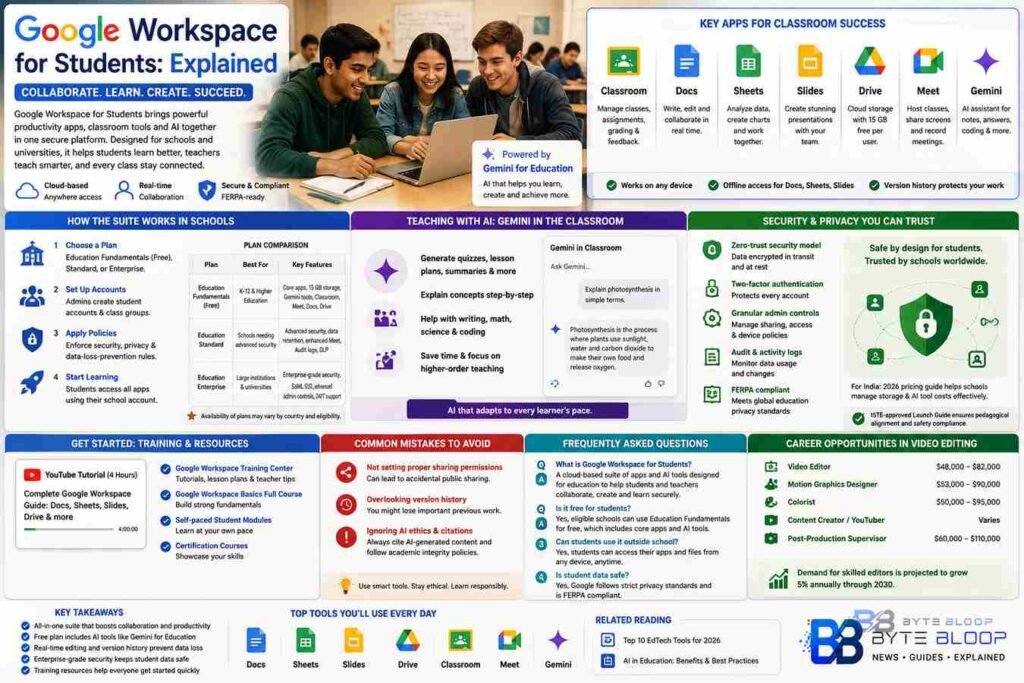
Google Workspace for Students is a cloud‑based suite that blends productivity, collaboration, and AI into a single platform tailored for K‑12 and higher‑education environments. Designed to replace traditional office software, it offers Google Docs, Sheets, Slides, and Classroom in a unified ecosystem that syncs across devices. The platform’s real‑time editing lets classmates draft essays together, while built‑in version history protects against accidental data loss. For teachers, the Classroom hub streamlines assignment distribution, grading, and feedback, all while maintaining compliance with privacy regulations such as FERPA. Students benefit from AI‑enhanced features like Gemini for Education, which can generate study notes, answer questions, and even draft code snippets. By centralizing learning materials, Google Workspace reduces the friction of switching between apps, making it easier for students to stay organized and focused. Finally, the platform’s security architecture—end‑to‑end encryption, two‑factor authentication, and granular admin controls—ensures that sensitive academic data remains protected. Together, these elements create a modern learning environment that is both flexible and secure.
How the Suite Works in Schools
Schools sign up through the Google Workspace for Education portal, choosing from Education Fundamentals, Standard, or Enterprise plans. Education Fundamentals is free for eligible institutions and includes core apps plus AI tools like Gemini Notebook. The Standard plan adds advanced security and compliance features, while Enterprise offers enterprise‑grade administration and support. Once enrolled, administrators can create student accounts, set up class groups, and enforce data‑loss‑prevention policies. Students receive a personalized Google account that links to their school’s domain, enabling seamless access to all Workspace apps.
Key Apps for Classroom Success
- Google Classroom – A hub for assignments, grading, and communication. Teachers can post resources, collect submissions, and provide instant feedback.
- Google Docs, Sheets, Slides – Real‑time collaboration tools that support co‑authoring, commenting, and version control.
- Google Drive – Cloud storage with 15 GB free per user, expandable with school‑wide storage plans.
- Google Meet – Video conferencing with screen sharing, recording, and live captions, ideal for remote or hybrid lessons.
- Gemini for Education – AI assistant that helps students draft essays, solve math problems, and generate coding examples.
Teaching with AI: Gemini in the Classroom
Gemini Notebook and Gemini in Classroom let teachers embed AI prompts directly into lessons. For instance, a history teacher can generate a quiz on the Renaissance, while a math teacher can create step‑by‑step problem explanations. Students can use Gemini to ask questions in real time, receiving context‑aware answers that adapt to their learning level. This reduces the time teachers spend on repetitive tasks and frees them to focus on higher‑order instruction.
Security and Privacy
Google’s security model is built around zero‑trust principles. All data is encrypted in transit and at rest. Administrators can enforce two‑factor authentication, restrict external sharing, and audit activity logs. For institutions in India, the 2026 pricing guide outlines how the Education Fundamentals plan offers free AI tools while keeping storage costs manageable. Schools can also use the ISTE‑approved “Launch Guide” to ensure pedagogical alignment and safety compliance.
Getting Started: Training and Resources
Google offers a comprehensive training center with tutorials, lesson plans, and certification courses. A popular 4‑hour YouTube tutorial walks users through Docs, Sheets, Slides, and Drive, covering advanced formatting and collaboration tricks. Teachers can also access the “Google Workspace Basics Full Course” to build a solid foundation, while students can explore self‑paced modules to master the tools.
Common Mistakes to Avoid
- Not setting up proper sharing permissions – students often inadvertently share private work publicly.
- Overlooking version history – forgetting to revert to earlier drafts can lead to data loss.
- Ignoring AI ethics – using AI-generated content without citation can breach academic integrity policies.
Key Takeaways
- Google Workspace unifies Docs, Sheets, Slides, Classroom, and Drive into a single, secure ecosystem.
- Education Fundamentals is a free plan that includes AI tools like Gemini for Education.
- Real‑time collaboration and version history reduce data loss and improve teamwork.
- Google’s zero‑trust security model protects student data and meets FERPA compliance.
- Training resources help teachers and students quickly adopt the platform.”]
- faqs
- :
- [object Object],[object Object],[object Object],[object Object]
- conclusion
- :
- Based on the available information and industry analysis
- Google Workspace for Students provides a comprehensive
- secure
- and AI‑enhanced environment that transforms traditional classroom workflows into collaborative
- data‑driven learning experiences. By integrating real‑time editing
- automated grading
- and advanced AI tools
- schools can reduce administrative overhead while boosting student engagement and academic outcomes. Its flexible pricing tiers
- robust security architecture
- and extensive training resources make it a practical choice for institutions worldwide seeking to modernize education. As schools continue to adopt digital-first strategies
- Google Workspace stands out as a scalable solution that supports both educators and learners in achieving their full potential.
- related_article_suggestions
- :
- [object Object],[object Object]
- last_updated
- :
- 2026-08-21
Conclusion
Based on the available information, this topic provides essential insights for readers looking to understand the core concepts and practical applications.